Couple Prompt You Can Copy and Paste

Free, ready-to-use couple prompts. Copy one, paste it into your favourite AI tool, and get to work.

3 prompts

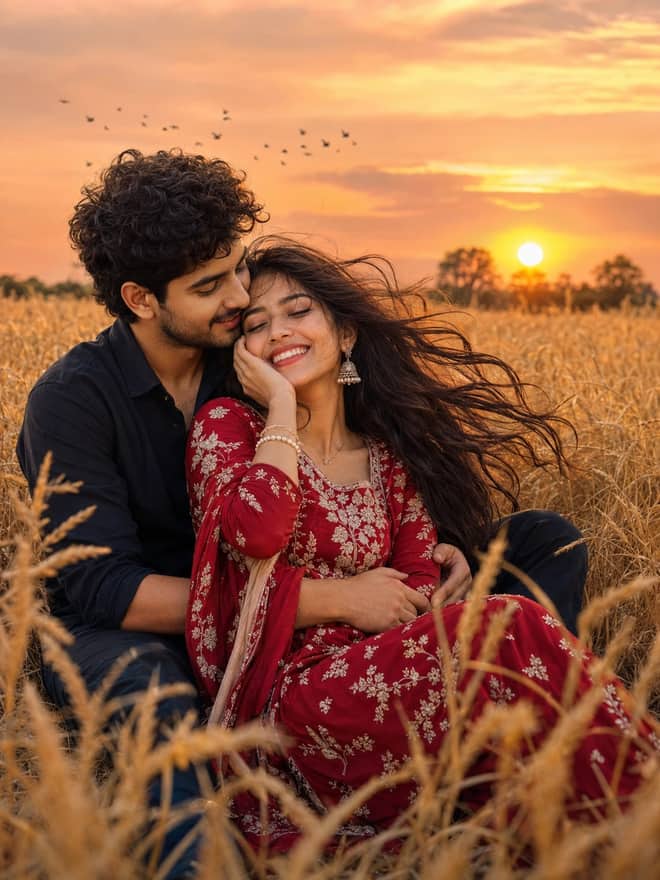
Indian Couple Portrait AI Photo Prompt for Gemini

Indian Couple Portrait AI Photo Prompt for Gemini

An Indian couple portrait prompt. Turn your photo into a romantic outdoor portrait of a couple in a red saree and red shirt. Edit in Gemini & ChatGPT.

5
Valentine's Day Couple AI Photo Prompt for Gemini

Valentine's Day Couple AI Photo Prompt for Gemini

A Valentine's Day couple prompt. Turn your photo into a romantic couple inside a golden glowing circle with neon text and floating hearts. Edit in Gemini.

8
Beach Couple Portrait AI Photo Prompt for Gemini

Beach Couple Portrait AI Photo Prompt for Gemini

A beach couple portrait prompt. Turn your photo into a romantic couple holding red roses on a beach with elegant name typography. Edit in Gemini & ChatGPT.

7

The guide

Everything about couple prompts

A couple prompt is the bit of text you paste into an AI image tool to turn a photo of you and your partner into something worth keeping, an anniversary scene, a retro film look, a quiet rainy walk, whatever you have in your head. The grid above is full of ready ones you can grab and use right now. This section is about the thinking behind them, so you can pick the right prompt, change it to fit your relationship, and stop burning attempts on results that look like two strangers photoshopped together.

What people actually want from a couple prompt

Almost nobody types a couple prompt because they want a random romantic image. They want one of three things. They want to restyle a real photo of the two of them. They want to put themselves into a scene they have never actually been to, like a beach at sunset or a snowy street in another country. Or they want to recreate a moment, an old date, a proposal, the first trip, in a look they could never afford to shoot for real.

That intent matters, because it changes how you write the prompt. A restyle keeps your faces and changes the world around you. A scene swap moves you both somewhere new. A recreation needs you to describe the feeling, the era, and the small details that made the moment yours. Knowing which of the three you are after saves you ten bad tries.

The couple prompt looks people keep reaching for

Some styles come back over and over because they read well on a phone screen and they survive being reshared. Here are the ones worth knowing.

Soft romantic and golden hour

The default for a reason. Warm low sun, soft shadows, the two of you close, eyes on each other instead of the lens. It hides flaws and makes almost any pair look comfortable together. If yours comes out flat, add late afternoon light, long warm shadows, and a shallow background blur.

Retro and film looks

Grainy 90s and early 2000s couple shots are everywhere. A faded color cast, a bit of grain, period clothing, maybe an old scooter or a film camera in frame. These feel like a memory rather than a photo, which is exactly why people save them. Name the decade and one or two props and the model fills in the mood.

Travel and dream-location scenes

For long-distance couples especially, this is the big one. You describe a place you both want to go, Paris in the rain, a Tokyo alley at night, a quiet hill station, and the tool drops you into it. It will not be a real trip, but it looks like one, and that is the point.

Anniversary and milestone recreations

Rebuild a moment you care about. The cafe where you met, the look of your wedding day, a first-anniversary feel with a particular color or season. The trick here is specific detail. The exact dress color, the season, the time of day. Generic wording gives you a generic couple.

Writing a couple prompt that holds both faces

The number one frustration is one person, usually the second, coming out looking like someone else. Faces drift when the source is weak or you ask for too much at once. A few habits fix most of it.

  • Start from a clear photo where both faces are well lit and roughly facing the camera. Side profiles and shadows are where likeness falls apart.
  • Tell the tool to keep both faces and identities the same. Say it plainly, do not assume it knows.
  • Change the scene or the style, but not ages, hair, and expressions in the same run. Pick one kind of change at a time.
  • Describe each person on their own. Her outfit and his, who is on which side, how close they stand.
  • Set the pose with intent. Holding one hand, an arm around a shoulder, foreheads close. Vague poses give you tangled hands and odd gaps.

Pick your couple prompt by what you want

Use this to match the result you are after to the wording and the tool that handles it best.

What you wantWhat to put in the promptBest tool for it
Restyle a real photo of you bothKeep both faces, change only the light, outfits, and backgroundGemini or ChatGPT image editing
Put yourselves in a dream locationName the place, the time of day, the weather, your poseGemini for likeness, Midjourney for pure look
Long-distance, two separate photosTwo face references, one shared scene and one light sourceGemini, then expect a few retries
Anniversary or first-meeting recreationThe exact season, color, place feel, and a candid poseGemini or ChatGPT for editing your real photo
Stylized art piece, faces matter lessWatercolor or pencil, keep the pose, soft line workMidjourney or any art-leaning model

The long-distance couple prompt, because it is harder

If you have never had a photo taken together, you are doing the toughest version of this. You give the tool two separate photos and ask it to place both people in one frame. It works, but the likeness is looser and you will run it more than once. Make it easier on the model. Use two photos shot at similar angles and similar light. Ask for one shared light source so you both sit in the same moment instead of looking pasted in. Keep the pose simple, side by side or one arm around the other, not a complicated embrace. And do not expect the first result to nail both faces. The second or third usually balances out.

Tip: write one couple prompt that worked, save it, and only swap the style or location line on each new try. Re-running a known-good prompt with one change beats rewriting the whole thing every time.

Couple prompt tools compared in plain terms

People ask which tool to use, and the honest answer depends on whether you are editing or inventing. Gemini, the image model people nickname nano banana, is the easiest place to restyle a real photo while keeping faces, and it is free to try in the Gemini app. ChatGPT's image tool does similar edits and is good at following a long, detailed instruction. Midjourney makes the most striking images, but it is built around generating from a prompt rather than faithfully editing your actual photo, so getting your exact faces is the hard part there. For a couple edit that has to look like you, start with Gemini or ChatGPT. For a stylized piece where the mood matters more than the likeness, Midjourney earns its place.

Common couple prompt mistakes and quick fixes

  • One face is wrong: use a clearer source and add a line locking both identities.
  • It looks like two separate portraits stuck together: ask for both people turned slightly toward each other and one shared light.
  • Hands are tangled: simplify the pose to a single held hand or an arm around a shoulder.
  • The scene you described got ignored: name fewer things but describe each in more detail.
  • Everything looks plastic: add film grain, natural shadows, and a real-camera reference like shot on 35mm.
  • The mood is off for an anniversary shot: add the exact season, color, and time of day instead of leaving it open.

A simple way to start your couple prompt

  1. Decide if you are restyling a real photo, moving to a new scene, or recreating a moment.
  2. Pick a prompt from the grid above that matches that goal.
  3. Attach your photo, or two photos if you are long-distance.
  4. Add a line that keeps both faces and identities the same.
  5. Run it, then change one detail, the light, the place, the outfit, and run again.

That loop is really all there is. Choose your goal, paste a prompt, lock the faces, change one thing per attempt. The romantic, retro, and travel couple images filling up feeds are not magic wording, they are this same process with a clear description of the moment. Grab a prompt above and start with the version of you two that you actually want to look at.

Questions

Frequently asked questions

What is a couple prompt and how do I use one?

A couple prompt is text you paste into an AI image tool, along with a photo of you and your partner, that tells it the scene or style you want. Copy one from the grid above, attach a clear photo, add a line saying keep both faces the same, and run it. Then change one detail and run again until it fits.

Can I make a couple photo if we are long-distance and have no picture together?

Yes, but it is the harder version. Give the tool two separate photos shot at similar angles and light, then ask it to place both people in one scene with a single shared light source. Keep the pose simple, side by side or an arm around the other. Expect to run it two or three times before both faces look right.

Which AI tool is best for couple photos?

For editing a real photo and keeping both faces accurate, Gemini or ChatGPT image editing is the easiest start, and Gemini is free to try in its app. Midjourney makes beautiful images but is built for generating from scratch, so exact likeness is harder there. Match the tool to whether you are editing your photo or inventing a new one.

How do I write a couple prompt for an anniversary or special moment?

Be specific about the moment. Name the season, the exact outfit or color, the place feel, the time of day, and a candid pose. Edit a real photo of the two of you rather than generating from scratch, since that keeps your faces. Then ask only to restyle the scene around you and run a few versions to get the mood.

Why does one of our faces come out looking wrong?

Usually the source photo is unclear or you asked for too many changes at once. Use a picture where both faces are well lit and facing forward, tell the tool to preserve both identities, and change only the scene or style in a single run. Avoid editing ages, hair, and expressions at the same time, since that is when faces drift.

Related searches